
explainer
UTM Parameters & Click IDs: Clean the Tracking Out of Your Links
By Uttam Regmi · Published 2026-10-07 · Updated 2026-10-07 · 12 min read · Fact-checked, sources cited
The utm_source, fbclid and gclid clutter in a link is tracking metadata, not part of the address, and removing it does not change which page loads. UTM parameters tell analytics tools how you arrived (which campaign, channel and source); click IDs like fbclid (Facebook) and gclid (Google Ads) let a platform tie your click back to a specific user and ad. None of it is needed to open the page. Stripping it gives you a shorter, cleaner link that does not leak where you got it. You can remove every known tracker from a URL in one step with the URL Tracking Parameter Cleaner, which does the whole job in your browser and never uploads the link.
What the parts of a URL actually do
A URL has a path (which page) and, after the ?, a query string of key=value parameters. Some of those parameters are functional: the page genuinely reads them to decide what to show (a product ?id=482, a search ?q=shoes, a page ?page=3). Others are tracking: the page ignores them completely, and they exist only so that someone, somewhere, can measure the click.
The confusion is that they sit side by side in the same query string. To a person they look equally important. In reality, deleting a functional parameter can change or break the page, while deleting a tracking parameter changes nothing you can see. The whole skill of cleaning a URL is telling the two apart, and the good news is that trackers have well-known names.
UTM parameters: campaign tags for analytics
UTM parameters (the “Urchin Tracking Module” tags, named after the analytics company Google bought) are the most common tracking you will see. There are five, and they are read by analytics platforms to attribute a visit to a marketing effort:
| Parameter | Answers | Example |
|---|---|---|
utm_source | where did the traffic come from? | newsletter, google, twitter |
utm_medium | what kind of channel? | email, cpc, social, referral |
utm_campaign | which campaign? | spring_sale, launch_2026 |
utm_term | which paid keyword? | running+shoes |
utm_content | which link or variant? | header_button, footer_link |
When a marketer builds a campaign link, they add these tags so that when you click, their analytics can say “this visit came from the spring-sale email, header button”. That is legitimate and useful for the publisher of the link. The key insight: the destination website does not use these values to render anything. They are pure measurement. Google documents the whole scheme in its campaign URL builder help.
So a link like:
https://example.com/article?utm_source=newsletter&utm_medium=email&utm_campaign=spring_saleloads the exact same article as:
https://example.com/articleThe second one is just cleaner, shorter, and says nothing about where you found it.
Click IDs: tying a click to a person and an ad
Click IDs are a second, more invasive category. Where UTM tags describe a campaign in general terms, click IDs are usually unique per click, which lets a platform connect that specific click to a specific user profile and ad impression. The common ones:
| Parameter | Added by | Purpose |
|---|---|---|
fbclid | Facebook / Instagram | Facebook Click Identifier, links the click to a user and ad |
gclid | Google Ads | Google Click Identifier, conversion tracking |
gclsrc, dclid, wbraid, gbraid | Google ecosystem | variants for different ad and privacy contexts |
msclkid | Microsoft Advertising | Bing Ads click tracking |
ttclid | TikTok | TikTok Ads click ID |
twclid | X / Twitter | X Ads click ID |
yclid | Yandex | Yandex click ID |
igshid | share/session identifier on Instagram links | |
mc_cid, mc_eid | Mailchimp | campaign ID and a per-recipient ID |
_hsenc, _hsmi | HubSpot | email encryption and message identifiers |
These matter more for privacy than UTM tags, because many of them identify you, not just the campaign. mc_eid, for instance, is a per-recipient email ID: forward a Mailchimp link with mc_eid still attached and you are effectively passing along your own tracking identifier. igshid and fbclid similarly carry session or click context tied back to the originating account. None of them are needed to open the page.
Which are safe to remove? (All of the tracking ones)
Here is the practical rule:
- Tracking parameters are always safe to remove from a link you share. UTM tags and click IDs are metadata about the click. The page does not read them. Remove them and the link still loads the same page.
- Functional parameters must be kept. Anything the page actually uses,
id,q,page,lang, a product variant, a timestamp an app needs, has to stay or the link may break or point somewhere else. - Custom/unknown parameters: leave them alone. A site’s own
?ref=might be cosmetic, or it might be load-bearing. Because you cannot know, the safe default is to keep anything that is not a recognised tracker.
This is exactly how the URL Tracking Parameter Cleaner behaves: it removes everything starting with utm_ plus a maintained list of known click IDs and trackers, and it leaves every other parameter (and the #fragment) untouched. It also shows you a list of precisely what it stripped, so nothing happens silently. If a cleaned link ever misbehaves, the original still works, because only the listed trackers were removed.
Why your links are full of this in the first place
You rarely add these yourself; platforms add them automatically as you move around:
- Copy a link out of an ad or a sponsored post and it arrives pre-stamped with a click ID.
- Click a link in a marketing email and the URL you land on (and might copy from the address bar) often carries
utm_tags and a per-recipient ID. - Share from inside a social app (especially Instagram and Facebook) and the app appends its own identifiers (
igshid,fbclid) to the “Copy link” result. - Follow a Google search ad and you pick up a
gclid.
So the long, ugly links people paste into chats and documents are not their doing. They are the residue of the tracking layer the modern web runs on. Cleaning the link before you pass it on is a small, decent habit: it stops your source and session riding along to whoever you send it to.
When you should keep UTM parameters
Removing trackers is the right default for links you receive and re-share. But there is a flip side: if you are the one running a campaign, UTM tags on the links you publish are how your own analytics understands where visitors came from. Strip those and you blind yourself.
So the two situations:
| Situation | Do |
|---|---|
| You are publishing a campaign link (ad, newsletter, social post) | Keep deliberate UTM tags, that is how you measure it |
| You are sharing a link you found or received | Clean it, the tags only leak your source and pad the URL |
In short: add campaign tags on purpose when you want attribution; strip them when they are just noise someone else left on the link. Build your own tags deliberately with a UTM builder (LazyTools has one in the developer tools); clean other people’s with the parameter cleaner.
How click IDs enable cross-site tracking
It is worth being precise about why click IDs are a bigger privacy concern than UTM tags, because the difference is not obvious from looking at them. A UTM tag like utm_campaign=autumn is the same for everyone who clicks that link; it describes the campaign, not the person. A click ID like fbclid or gclid is typically unique to your individual click, and that is the whole point.
Here is the mechanism. When you click an ad, the platform appends a unique click ID and records, on its side, which user profile that ID belongs to. When you land on the advertiser’s site, that site can store the click ID (often alongside a first-party cookie) and later send it back to the platform to say “this click converted”. That round trip lets the platform join your browsing on the advertiser’s site to your identity in its own system. Forwarding a link with a live click ID attached, or leaving one in a URL you publish, can pass that identifying thread along to wherever the link travels.
This is also why several browsers now strip these parameters automatically. Firefox’s Enhanced Tracking Protection and Brave remove known click IDs from URLs in some modes, and Safari and iOS have moved in a similar direction for specific parameters. Cleaning a link yourself before sharing is the manual version of the same hygiene, and it works everywhere regardless of which browser the recipient uses.
How to build good UTM links (when you do want them)
Stripping trackers is for links you receive. When you are the publisher and you genuinely want attribution, build the UTM tags deliberately and consistently. A few rules keep your analytics clean:
- Be consistent with case and spelling.
Email,emailande-mailare three different sources to analytics. Pick lowercase, stick to it, and keep a short list of approved values. - Use the five parameters for their intended jobs.
utm_source= the specific origin,utm_medium= the broad channel,utm_campaign= the campaign name. Do not stuff everything intoutm_campaign. - Do not put personal data in a UTM tag. They end up in analytics reports and server logs in plain text; a name or email in
utm_contentis a leak. - Keep them off internal links. Tagging links between pages of your own site confuses analytics into thinking a new session started. UTM tags are for inbound links only.
LazyTools has a dedicated UTM campaign URL builder for exactly this. The division of labour is clean: build tags on purpose with the builder, remove other people’s leftover tags with the cleaner.
Tracking parameters and SEO
There is an SEO angle that matters if you run a website. Search engines treat example.com/page and example.com/page?utm_source=x as potentially the same content at two URLs, which can dilute ranking signals across duplicates and waste crawl budget. Good practice is to make sure every page declares a rel="canonical" link pointing at its clean, parameter-free URL, so search engines consolidate on the canonical version regardless of which tracked variant they encounter. Cleaning a link before you publish or share it is a small complementary habit: the fewer tracked variants of a URL in the wild, the fewer duplicates to manage.
Link shorteners do not clean anything
A common misconception is that running a messy link through a shortener “cleans” it. It does not. A shortener like a bit.ly link simply hides the long URL behind a redirect; all the tracking parameters are still there, they just travel on the far side of the redirect where you cannot see them. Worse, many shorteners add their own tracking on top. If privacy is the goal, clean the destination URL first, then shorten it if you still need a short link, never the other way around.
Auditing a suspicious link
If someone sends you a link and you want to see what is riding along before you click or re-share, you can read a URL like a sentence:
- Everything before the
?is the address (the page). - Everything after the
?is parameters, split on&. - Anything starting
utm_is a campaign tag. - Anything matching a known click ID (
fbclid,gclid,msclkid,igshid,mc_eid, and the others in the table above) is per-click tracking. - Whatever is left is probably functional, keep it.
The URL Tracking Parameter Cleaner does this read for you and lists exactly what it would remove, which also makes it a quick way to inspect a link, not just clean it: paste it, and the removed-list tells you what tracking was attached and by whom.
A worked example
Start with a link copied from a marketing email:
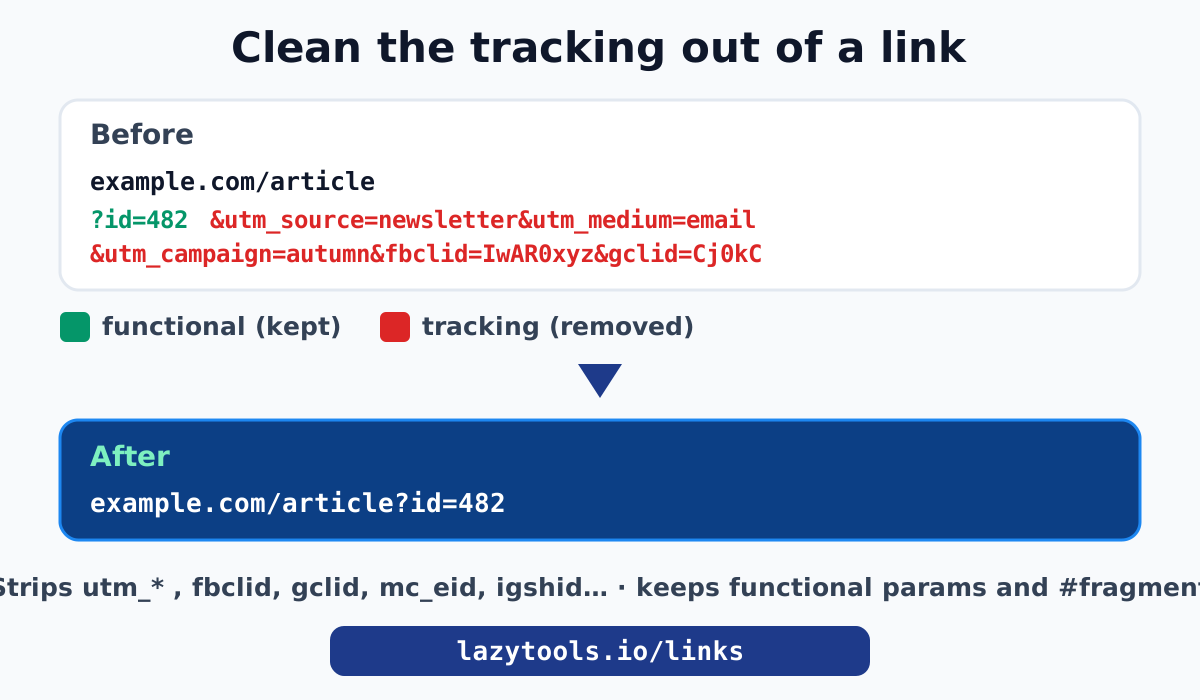
https://shop.example.com/product?id=482&utm_source=newsletter&utm_medium=email&utm_campaign=autumn&mc_eid=a1b2c3&fbclid=IwAR0xyzWhat is what:
id=482is functional, it selects the product. Keep it.utm_source,utm_medium,utm_campaignare campaign tags. Remove when sharing.mc_eid=a1b2c3is your personal Mailchimp recipient ID. Definitely remove.fbclid=IwAR0xyzis a Facebook click ID. Remove.
Cleaned:
https://shop.example.com/product?id=482Same product page, none of the tracking, and you are no longer forwarding your own email identifier to strangers.
A fuller catalog of what gets stripped
The two UTM-plus-click-ID groups cover the common cases, but platforms have accumulated a long tail of identifiers. A good cleaner recognises them by name. Grouped by origin:
| Origin | Parameters |
|---|---|
| Analytics campaign tags | utm_source, utm_medium, utm_campaign, utm_term, utm_content, utm_id |
| Google ecosystem | gclid, gclsrc, dclid, wbraid, gbraid |
| Meta (Facebook/Instagram) | fbclid, igshid, fb_action_ids, fb_source |
| Microsoft / Bing | msclkid |
| TikTok / X / Yandex | ttclid, twclid, yclid |
| Email marketing | mc_cid, mc_eid (Mailchimp), _hsenc, _hsmi (HubSpot), vero_id, mkt_tok |
| Other platforms | oly_anon_id, oly_enc_id, _openstat, li_fat_id (LinkedIn), epik (Pinterest), rb_clickid, s_cid |
The list grows as new ad platforms appear, which is exactly why a maintained cleaner is more reliable than trying to remember them all. The URL Tracking Parameter Cleaner carries this block-list and strips everything starting utm_ on top of it, while leaving anything it does not recognise in place so a functional parameter is never removed by accident.
Server-side stripping and email prefetch
Two related behaviours are worth knowing because they explain why your own tracking data is noisier than you expect.
Email prefetch and privacy proxies. Mail apps increasingly load link previews and images through a proxy, and privacy features like Apple’s Mail Privacy Protection fetch content ahead of time from Apple’s servers. That can fire utm_ and open-tracking pixels without a human ever clicking, which inflates “opens” and muddies attribution. It is a reason not to over-trust campaign numbers, and a reason recipients benefit from clean links.
Redirect chains. Many links pass through one or more redirects (a shortener, an email gateway, an ad network) before reaching the real page, and each hop can add or carry tracking. The parameters you see on the final URL may have been bolted on several hops back. Cleaning the destination URL removes what is attached at the end; if you want to see the whole chain, follow the redirects (for example with curl -IL) and clean the final address.
Clean a link privately
The junk in a URL breaks down into two buckets: campaign tags (utm_*) that analytics reads, and click IDs (fbclid, gclid, mc_eid and friends) that tie a click to a person and an ad. Neither is part of the address, so neither is needed to load the page, which is why cleaning a link is safe as long as you only touch known trackers and keep the functional parameters.
The URL Tracking Parameter Cleaner does exactly that, in your browser, and tells you what it removed. Because the link never leaves your machine, it is safe to clean URLs that point at private or unreleased pages, the same privacy principle behind the rest of the Links and Sharing toolkit. While you are sharing files, the Google Drive, Dropbox and GitHub raw link guides cover turning share links into clean direct downloads.
Google explains UTM campaign parameters in its URL builder help article.
Frequently asked questions
What is fbclid and is it safe to remove?
fbclid is the Facebook Click Identifier that Facebook and Instagram append to outbound links so a click can be tied back to a user and an ad. The destination page does not need it to load, so removing it is safe and makes the link shorter and more private. The LazyTools URL Tracking Parameter Cleaner strips it along with other click IDs.
What is gclid?
gclid is the Google Click Identifier added by Google Ads to track which ad click led to a visit, feeding conversion data back to the advertiser's account. Like fbclid, it is metadata about the click, not something the page needs, so it is safe to remove from a link you are sharing.
What do the utm_ parameters mean?
They are campaign tags read by analytics tools. utm_source is where the traffic came from (newsletter, google), utm_medium is the channel type (email, cpc, social), utm_campaign names the campaign, and utm_term and utm_content hold keyword and variant details. They describe how you arrived, not what page to show, so stripping them does not break the link.
Does removing tracking parameters break the link?
Not for tracking parameters. They are information about the click, not instructions the page needs to render. A good cleaner only removes parameters on a known-tracker list and leaves functional ones (like ?id= or ?q=) and the #fragment untouched, so the cleaned link loads the same page.
Why are the links people send me so long?
Platforms add tracking automatically. Analytics tools append utm_ tags, ad networks add click IDs like gclid and fbclid, and email and social systems add their own identifiers so they can measure and attribute clicks. Copying a link from an ad, an email or a social app usually drags all of that along.
Is the URL I paste into the cleaner sent anywhere?
No. The LazyTools URL Tracking Parameter Cleaner removes the parameters in your browser with JavaScript. The URL is never transmitted to LazyTools or anyone else, which is the whole point: a privacy tool that uploaded your links would defeat itself.
Should I keep UTM parameters on my own campaign links?
Yes, keep them on the links you publish for a campaign, because that is how your analytics attributes the traffic. Clean them off links you receive or re-share personally, where the tags only leak where you got the link and pad the URL. Add campaign tags deliberately; strip them when they are just noise.